The following explains how to submit sales to Yellow Dog via the Fetch API.
Use the POST /transactions endpoint to submit your sales transactions to Yellow Dog. The request payload will contain transactions that you submit either one at a time as you capture them or periodically in batches. When sending multiple transactions per second, API throughput becomes a factor favoring batches. If you use batches, sending them every ten minutes or less is considered reasonable. We recommend that all transactions be submitted before they are 30 minutes old to keep reporting delays to a minimum.
The JSON payload of a POST /transactions request is a nested structure. At the top is an array of transactions. Among the properties of each transaction is an array of lines to list items sold, refunded, or voided, in that transaction. The example below includes properties typical for an F&B transaction. A retail transaction will use some properties that are different from some of those appearing in this F&B example.
  [ {
      "thirdPartyId": "AcmePOS_FunValley_Lakeside_1001",
      "transactionNumber": "454545",
      "checkClosed": "2021-03-11T15:38:55Z",
      "employeeNumber": "OneRing",
      "employeeName": "Bilbo Baggins",
      "tender": "Cash",
      "registerNumber": "1",
      "registerName": "Shire",
      "reference": "Transaction with one line",
      "store": { "id": "6a5386e3-f6f3-11e3-8ff2-000c29d58da6" },
      "lines": [ {
          "thirdPartyLineId": "AcmePOS_FunValley_Lakeside_1001_1",
          "itemNumber": "101",
          "itemDescription": "Burger",
          "itemRetail": 15,
          "itemDiscount": 0,
          "quantity": 1,
          "modifier": null
      } ]
} ]| transactionNumber | See specific section below |
| thirdPartyId | See specific section below |
| lines.thirdPartyLineId | See specific section below |
| checkClosed | The DateTime that the check was closed or made effective at the point of sale, in ISO 8601 format. Note that this can be presented in UTC or with a time zone offset. |
| store.id | This is the Yellow Dog StoreID associated with the Location where the sale was made. Your integration will need to have a method to map YD Stores via Store ID to Locations in your system as part of the installation process to ensure that the correct store.id is provided with each transaction. |
| lines.itemNumber (Required if supporting POS Item Mapping to recipes in Yellow Dog; typically used for F&B operations) | This should be the unique id for the item in your system. |
| lines.sku (Required if supporting matching sales to Yellow Dog SKU or UPC; typically required for Retail and Concessions operations) | The expectation is that part of installation of this integration would detail how the customer will ensure that the Yellow Dog SKU/UPC will match with the POS field used to populate transaction.lines.sku. For integrations that will pull item data from Yellow Dog, your item pull code will need to populate the Yellow Dog SKU/UPC into the same field used as lines.sku in transactions. For sales-only integrations, this may require that the POS field is updated to match the Yellow Dog SKU/UPC, if possible, or vice-versa; however, it is common for the same YD database to have more than one POS integration, which may require that the YD SKU not be changed. |
| lines.itemDescription | This is the description of the line item from your system. |
| lines.itemRetail | This is the unit retail for the line item before discounts, taxes, or fees. Must be a positive value. The expectation is that lines.itemRetail multiplied by lines.Quantity will equal the total retail of the line item before any discounts, taxes, or fees. Note that this amount is used for the sale in sales reporting and doesn’t affect the retail price assigned to the item in YD. |
| lines.itemDiscount (Required if discount is being applied to the line) | This is the unit discount for the line item. Must be a negative value. The expectation is that lines.itemDiscount multiplied by lines.quantity will equal the total discount for the line item. |
| lines.Quantity | Positive value designates the quantity sold. Negative value designates the quantity returned on return lines. 0 designates a voided line. |
| lines.lineNumber | This can be the number/code/id associated with the line in your system, or it can be an index. |
| Lines.modifier (Required if supporting modifiers and the line is a modifier) | When the line is a modifier, this field should be populated by the thirdPartyLineId of the line item that it is modifying. |
| lines.item.id (Required if matching sales to items directly) | If your integration is also pulling item data from Yellow Dog into your system, it is recommended that you pull in the items.id GUID and populate it here when posting sales to ensure a direct match to the item in YD. |
Three properties in the above payload identify the transaction.
- transactionNumber
- thirdPartyId
- thirdPartyLineId
The POS defines each of these properties. Common industry best practices apply to the transactionNumber and are strongly recommended. The other two are created by the POS for Yellow Dog to uniquely identify the transactions within a YD database and must satisfy strict requirements for the integration to receive certification by Yellow Dog.
The transactionNumber is a string representing the value that the POS uses to identify the transaction within its own system. It is often also known as a check number. Many POS systems guarantee that this number is unique for all time, at least within the context of a specific revenue center (ie. selling location). Some POSs allow the count to be restarted after some period of time. In these cases, both the date of the transaction and its revenue center are needed to distinguish two transactions with the same transactionNumber value.
Individual transactions and transaction lines carry unique IDs that distinguish them from other transactions created by this or any other POS connected to the same database. These IDs are found in the thirdPartyId and thirdPartyLineId properties. It is important that the POS assures unique values for these IDs. The diagram below illustrates the method we recommend for composing unique IDs.
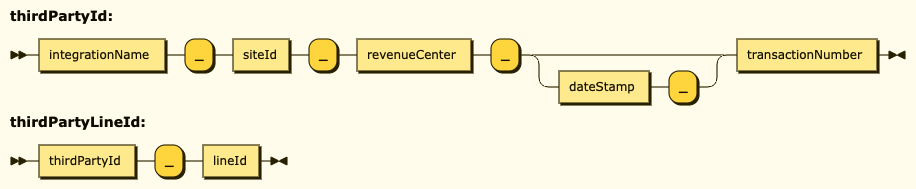
The components of these identifiers are alphanumeric strings separated by underscores. Each of these component parts must avoid special characters such as whitespace and underscores. By avoiding whitespace, the string is understood as a complete name By using underscores only as separators between the parts, the name can be visually parsed for diagnostic purposes and name collisions with other integrations can be avoided.
Ultimately, the POS is expected to use this formula to assure that the composed thirdPartyId and thirdPartyLineId values meets the following goals:
- Uniqueness -- to allow them to be used as database keys and avoid collisions.
- Visual Parsability -- to allow humans to make sense of these keys when performing manual diagnostics.
If the POS integration developer has a good reason to prefer an alternative scheme for generating these identifiers, they need to raise it with with their Yellow Dog integration guide and gain approval before the QA and certification process.
Note that transactions may sometimes intentionally reference previously used IDs in order to overwrite and update previous versions of these transactions. This is particularly useful for POSs that wish to void a line from a previously submitted transaction or apply corrections in the case of mistakes. Not all POSs choose to take advantage of this update capability. If any POS were to accidentally use an existing ID for a new transaction, it would have the effect of unintentionally updating the transaction with the coincident key.
If the POS does use the ability to overwrite previous transactions, they must pay particular attention to preserving the original thirdPartyLineId values in each subsequent submission to overwrite the transaction as described under The “thirdPartyLineId” in detail.
As illustrated in the diagram above, a thirdPartyId can be created as a concatenation of at least four alphanumeric strings separated by underscores to assure uniqueness within a database. Each of these component parts must avoid special characters such as whitespace and underscores. By avoiding whitespace, the string is understood as a complete name By using underscores only as separators between the parts, the name can be visually parsed for diagnostic purposes and name collisions with other integrations can be avoided.
The integrationName part will be approved during Yellow Dog certification to uniquely identify your POS integration.
The siteId is configured by the POS to identify the venue at which the integration is installed. This permits two instances of the same integration to submit transactions to the same database without collision between generated identifiers.
The revenueCenter is configured by the POS to identify a revenue center within a venue.
The dateStamp part is only required if the POS cannot guarantee the uniqueness of a transactionNumber over time for a given revenue center.
The transactionNumber may be the same as the transactionNumber property of the specific transaction.
A thirdPartyLineId can be created as a concatenation of the thirdPartyId of the transaction containing this line and a lineId integer that uniquely distinguishes the line within the context of the transaction. As a result, the thirdPartyLineId will uniquely identify, within the database, a specific line within a specific transaction.
Note that the index position of each line within a transaction payload can generate the lineId suffix when a transaction is first submitted but that the sequence can change when a transaction is resubmitted for an update. For example, the second line of a three line transaction can be removed from the sequence by an updated transaction that voids this line. As a result, the updated transaction will preserve only two lines, one with a “1” as the lineId suffix and one with a “3”. Those two remaining lines must keep their original thirdPartyLineId names despite the break in the sequence.